


Audit creation
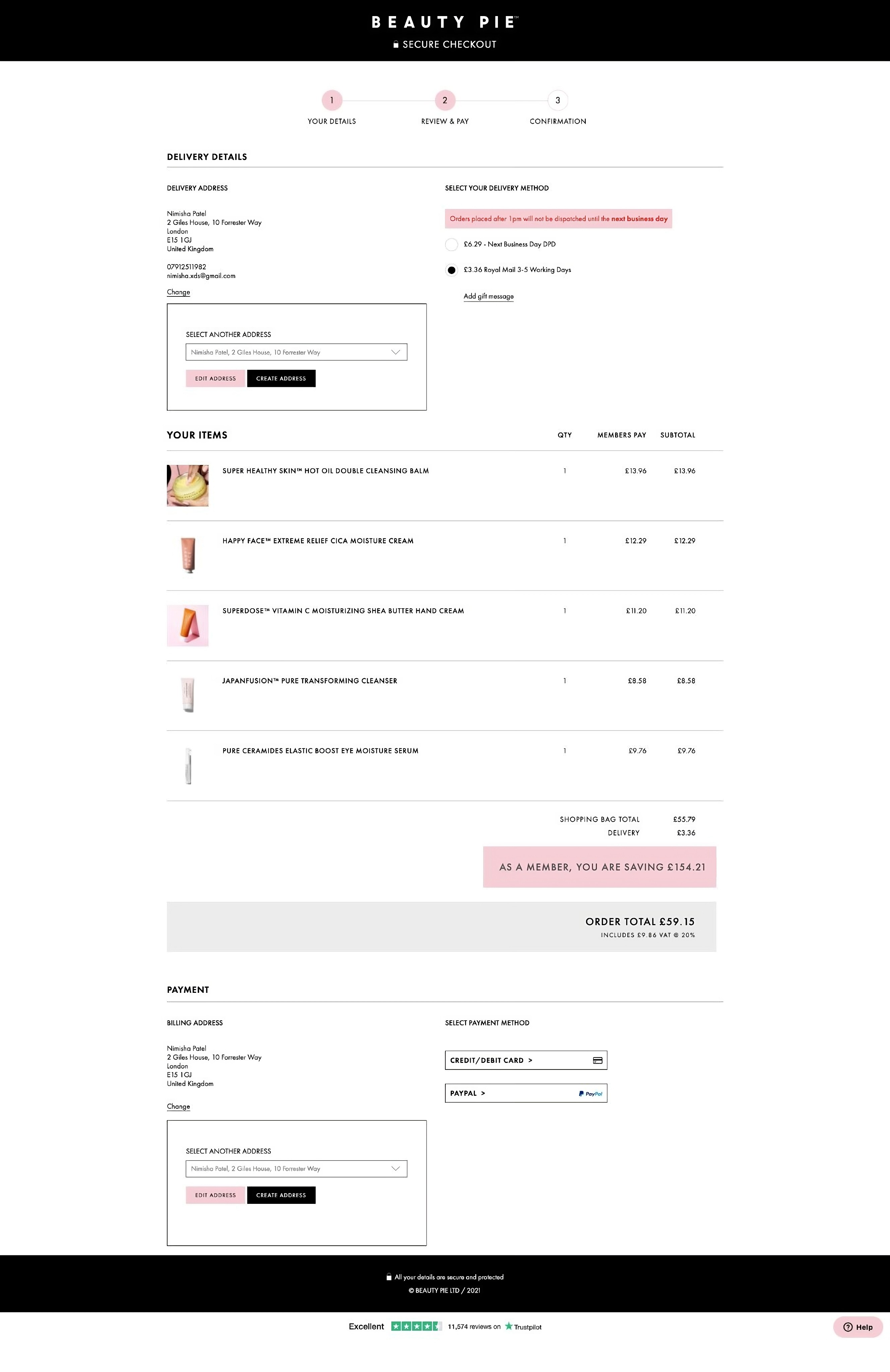
Audit highlighted checkout flaws which were harming conversion rates.
We conducted a high-level audit of the checkout process, incorporating both new insights and previously identified issues.
Not only did this identify high priority design tasks for usability testing but it also helped reveal some constraints and out of scope work. Payment options was an area revealed where we had to keep the same interaction & payment options.
Audit highlights for the previous checkout design
4
2
3
2
2
2
3
5
Planning
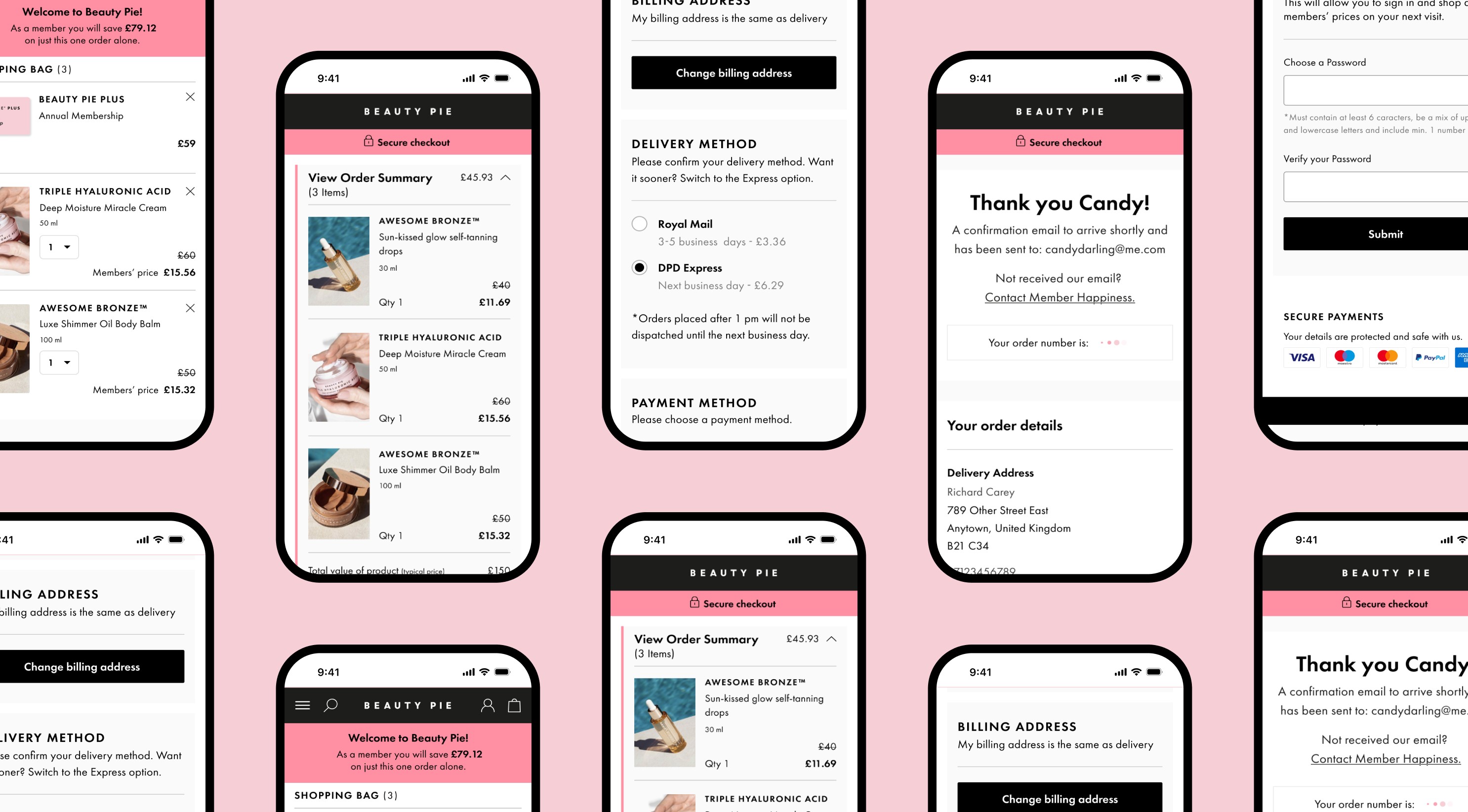
Creating variants helped with designing and iterating rapidly for future multiple flows.
Since there was no existing design system to work with, I worked on creating components and variants to ensure consistency and efficiency across all designs which would later on help with rapidly creating all the other needed flows.
Example showing variants for the mobile order summary.
Taking advantage of variants for the order summary component.
The order summary is an example of a component where I took advantage of using variants where I could easily interchange depending on the flow.
• US/UK: Variant changes allowed me to show differences in currency, tax and delivery options between the two countries.
• Open/Closed State: This allowed me to easily create interactions for the prototype.
• Member & Non-Member customers: As a non-member you would have an annual membership shown in your order summary along with the cost where being a member you would already have paid for a membership so would be excluded.
Setting a foundation and Planning was a key part to be able to create the 8 prototyped flows.
Two flows were created for members and non-members in the UK market which were also needed for the US market. Along with the desktop versions I also designed the mobile versions which would total to 8 flows.
Once I had designed one flow along with the components and variants, I could easily replicate it for the other flows and change the variants.
Not only did this allow me to create the rest of the flows rapidly but also helped with maintenance and iterations.
Example of creating another prototype flow by swapping the variants for a members flow.
Solution
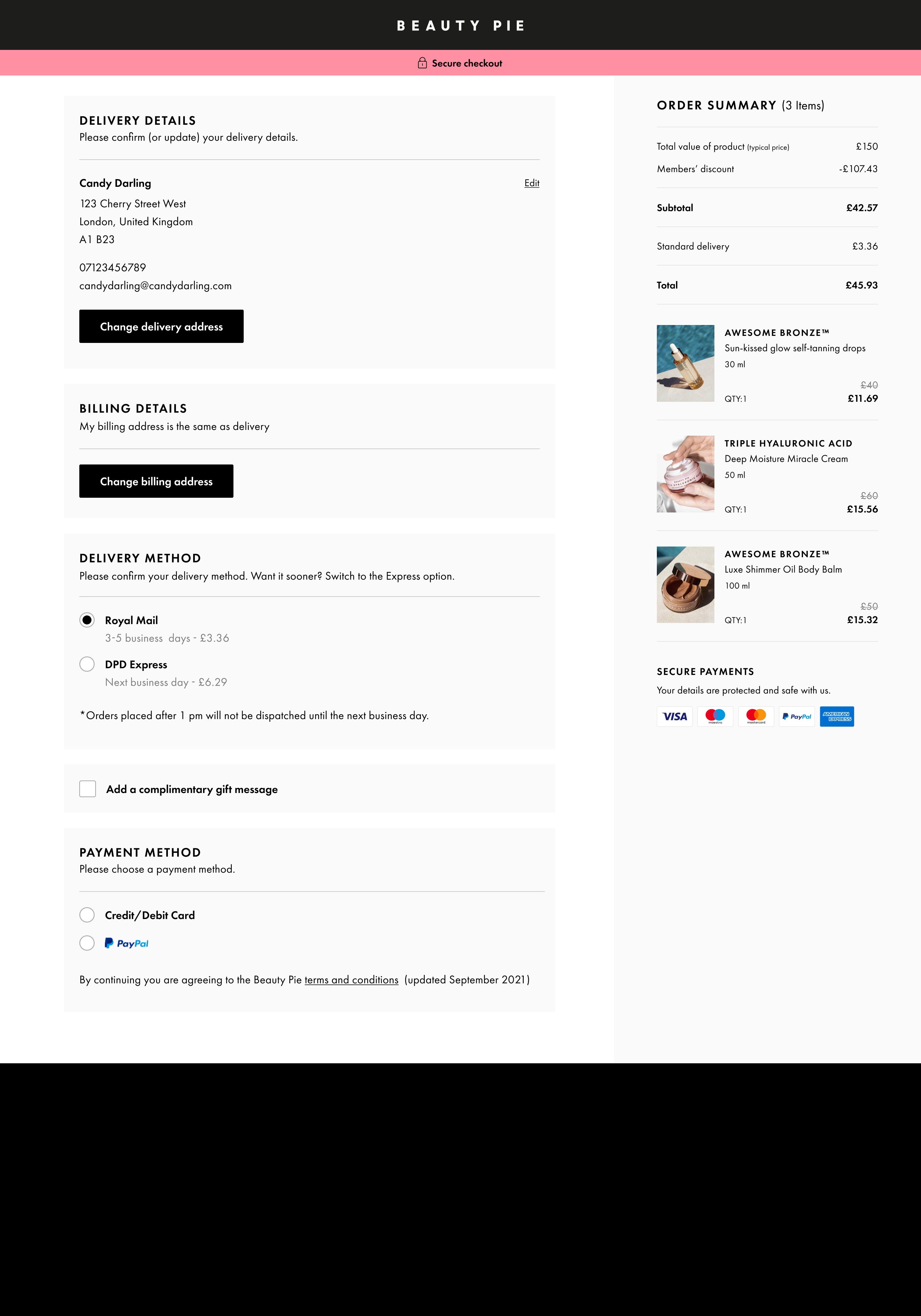
Creating a streamlined one-page layout for a efficient user experience.
4
2
3
1
One Page Checkout: By creating a new linear design users can now complete tasks and review all their details easily before purchasing without leaving the checkout experience.
2
One-Column Layout: This helps users scan from top to bottom more easily, allowing them to complete fields faster and more efficiently.
3
Consistent order summary: This reassures customers by keeping their order details in view without the user having to leave and disrupt the checkout flow and is a familiar and intuitive design pattern.
4
Change Delivery Address: A clear call to action button with the ability to choose other saved addresses.
Usability Testing
1. Non-Member usability test
For non-members we tested for our assumptions on the use of visual steps, account creation and newly added features.
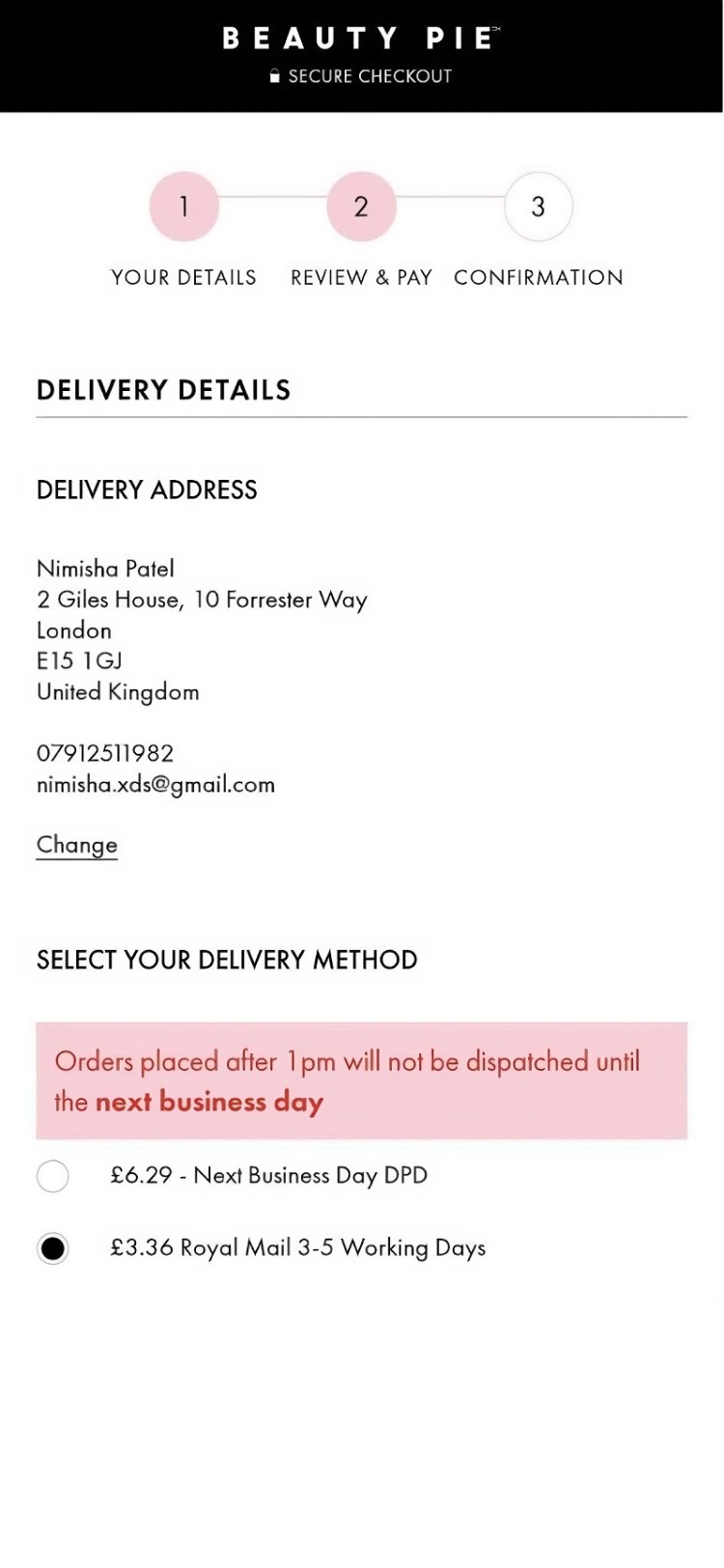

With visual steps, users had to jump back and forth to see their details.
Removing steps in the checkout allowed users to view all their information at a glance.
By providing a summary of a completed section users are able to quickly review all previously entered data and supports users' needs to "Double Check" before making a purchase.
The value is that it removes the friction of having to open a section to see if the details are correct and/or having to pogo back and forth through different steps. Instead users can now review quickly on 1 page.
Combining delivery and password creation for an easy account creation.
As a non-member checking out with a membership, users need to create an account.
By combining delivery details and password creation together we would alleviate the need to enter details in twice and have a more seamless checkout experience compared to having a separate sign up page with the need for the user to add their address and then move onto the checkout process where they would need to add their delivery details in again.
Users can now view their order summary at any stage of the checkout.
The total price and number of items are now instantly viewable, making it more convenient for the user, as there is no need to open the summary unless they want to see specific information.
The order summary is also consistently present at the top of the page, making it readily accessible at any point in the user journey.
Numeric keyboard is triggered instead of alphabetic.
When users are inputting only numbers, such as in a phone number field, the numeric keyboard should be displayed.
This allows users to enter their number immediately, reducing friction compared to showing an alphabetic keyboard, where they would have to switch to the numeric keyboard.
2. Member usability test
The member flow usability test revealed that users found it challenging to proceed to checkout.
We tested the interaction for adding an address, changing billing address and continue checkout for this flow and noticed that after successfully changing their billing address users struggled to continue to checkout.
Participants would pause and scroll up and down the screen looking for a CTA to checkout before eventually realising that they would need to choose a payment option first and enter their details in, and then continue with payment to checkout.
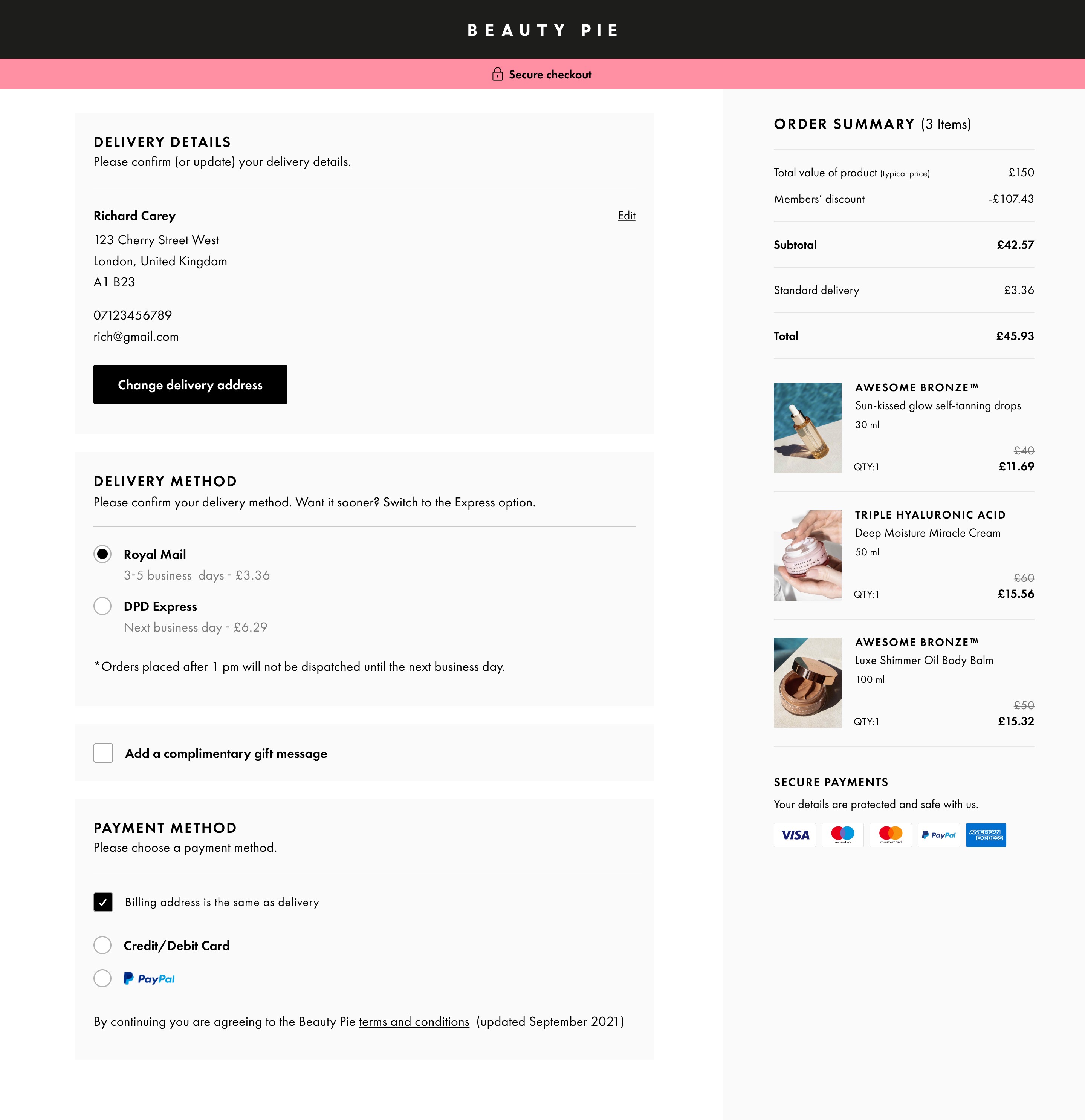
First design with the option to change billing address in the payment method component.
1
3 possible reasons for why users found it difficult to checkout.
1
Billing details residing within payment method - Having both the billing details and payment options in one component felt like one step therefore participants looked for the next step.
No saved card details - One participant mentioned that being a member they would have expected their card details to be saved and would just look for a CTA to check out.
The instructional step after adding billing details in the UX test was described to "complete checkout" - This may have been cemented into the user's mind to look for a "complete checkout" button as two users were looking for a button that would say complete or proceed to checkout.
Having an instructional step saying "Add your payment details and proceed to checkout" might have had a different outcome.
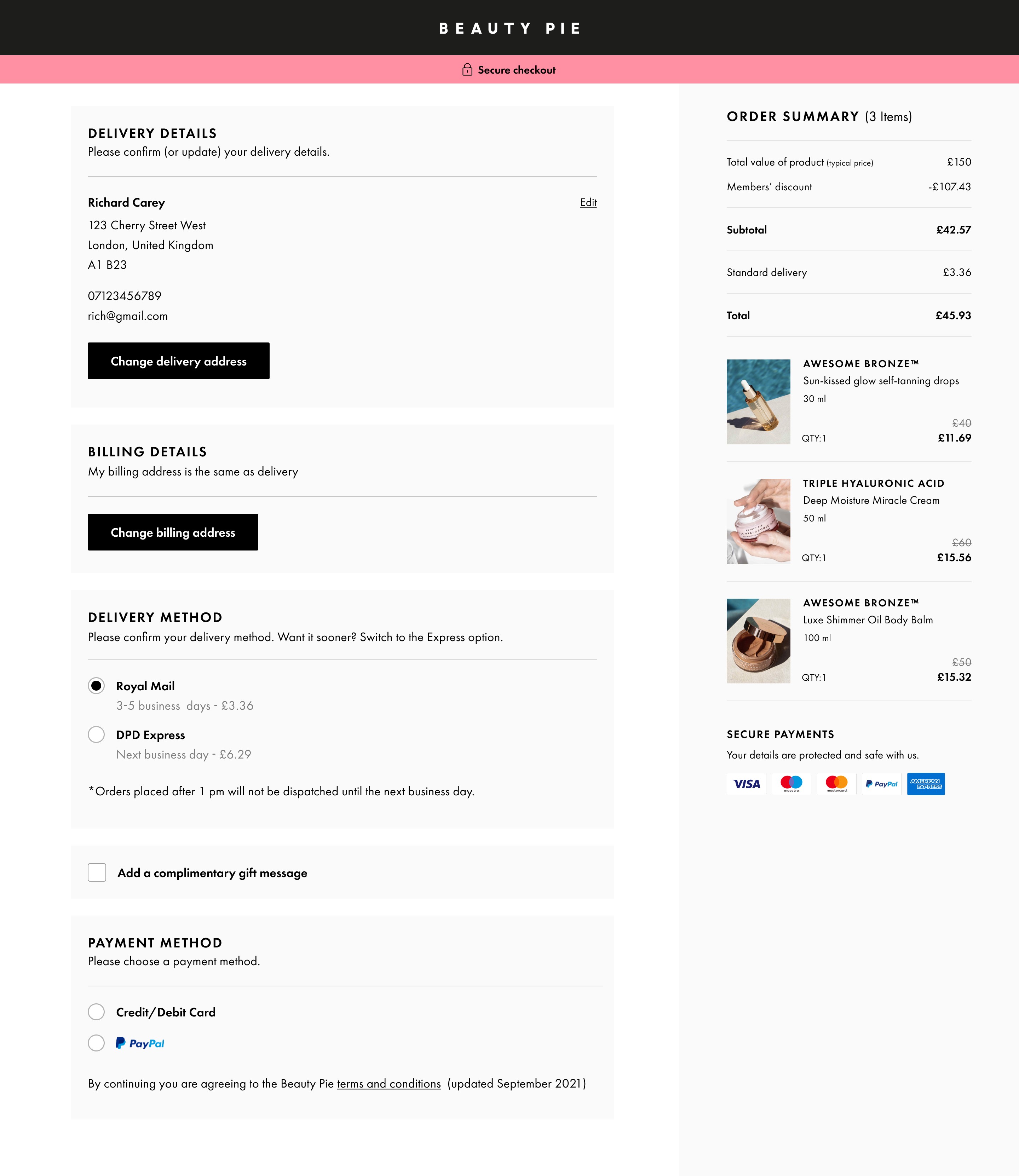
Amends made after usabilty test now showing billing details in its own section immediately after delevery details.
1
2
3
An iteration was made by moving "Billing Details" to its own section which made it more clearer.
A new section was created for Billing details with a clear CTA to change address which follows straight after delivery details. This ensured that the last step is the payment option and that anything inside it would be associated to payment making it less prone to confusion.
1
New billing details section: This now looks like its own step in the flow and comes straight after delivery details.
2
A clearer CTA: This made the CTA a lot clearer than before which was a checkbox.
3
Payment method section just for payment options: Now that billing details has been taken out there would be less confusion on by passing the entering of payment details.
Results

20 participants for each test were asked to rate the ease of checking out from 1 to 5.
1 being very difficult to 5 being very easy.