

OVO Energy

Improving payment clarity for On-Demand Customers.

Role

Experience Designer

Contract

3m Extended to 6m

OVO Energy

Improving payment clarity for On-Demand Customers.

Role

Experience Designer

Contract

3m Extended to 6m

OVO Energy

Improving payment clarity for On-Demand Customers.

Role

Experience Designer

Contract

3m Extended to 6m

12:54
12:54
12:54

Context

Rising energy costs and customer uncertainty.

During the national energy crisis, rapidly rising wholesale prices caused energy bills to increase, leaving many customers uncertain about what they owed and how to manage payments.

This case study focuses on Collectable Balance, a key initiative at OVO Energy aimed at improving payment clarity and support for On Demand customers, who pay their energy bills upon receipt rather than via direct debit.

Context

Rising energy costs and customer uncertainty.

During the national energy crisis, rapidly rising wholesale prices caused energy bills to increase, leaving many customers uncertain about what they owed and how to manage payments.

This case study focuses on Collectable Balance, a key initiative at OVO Energy aimed at improving payment clarity and support for On Demand customers, who pay their energy bills upon receipt rather than via direct debit.

Context

Rising energy costs and customer uncertainty.

During the national energy crisis, rapidly rising wholesale prices caused energy bills to increase, leaving many customers uncertain about what they owed and how to manage payments.

This case study focuses on Collectable Balance, a key initiative at OVO Energy aimed at improving payment clarity and support for On Demand customers, who pay their energy bills upon receipt rather than via direct debit.

Problem & Goals

Customers saw different amounts across channels and didn't know how much to pay.

On Demand customers received a bill by email or post, but the app and web showed Today’s Balance, a live running total that did not match the amount needed to stop collections activity, leading to confusion and support calls.

We needed to introduce Collectable Balance as a new data point to show the exact amount customers needed to pay. Today’s Balance could remain visible, but it was critical to ensure it did not cause confusion with Collectable Balance

Problem & Goals

Customers saw different amounts across channels and didn't know how much to pay.

On Demand customers received a bill by email or post, but the app and web showed Today’s Balance, a live running total that did not match the amount needed to stop collections activity, leading to confusion and support calls.

We needed to introduce Collectable Balance as a new data point to show the exact amount customers needed to pay. Today’s Balance could remain visible, but it was critical to ensure it did not cause confusion with Collectable Balance

Problem & Goals

Customers saw different amounts across channels and didn't know how much to pay.

On Demand customers received a bill by email or post, but the app and web showed Today’s Balance, a live running total that did not match the amount needed to stop collections activity, leading to confusion and support calls.

We needed to introduce Collectable Balance as a new data point to show the exact amount customers needed to pay. Today’s Balance could remain visible, but it was critical to ensure it did not cause confusion with Collectable Balance

My Role

I led the UX design on Collectable Balance within the payments team.

I explored the existing payment journey to identify points of confusion and payment friction, designed and prototyped solutions introducing Collectable Balance as the primary payment reference, validated them through usability testing, and iterated on the designs in collaboration with product and engineering.

Services

Stakeholder Interviews

User Journey Mapping

Usability Testing

Prototyping

Reporting

Team

Lead Experience Designer

Product Lead

Experience Designer

My Role

I led the UX design on Collectable Balance within the payments team.

I explored the existing payment journey to identify points of confusion and payment friction, designed and prototyped solutions introducing Collectable Balance as the primary payment reference, validated them through usability testing, and iterated on the designs in collaboration with product and engineering.

Services

Stakeholder Interviews

User Journey Mapping

Usability Testing

Prototyping

Reporting

Team

Lead Experience Designer

Product Lead

Experience Designer

My Role

I led the UX design on Collectable Balance within the payments team.

I explored the existing payment journey to identify points of confusion and payment friction, designed and prototyped solutions introducing Collectable Balance as the primary payment reference, validated them through usability testing, and iterated on the designs in collaboration with product and engineering.

Services

Stakeholder Interviews

User Journey Mapping

Usability Testing

Prototyping

Reporting

Team

Lead Experience Designer

Product Lead

Experience Designer

Research & Insights

Bills and online balances didn't match.

Mapping the payment journey revealed a fundamental disconnect between what customers were told to pay and what they saw online.

  • Today's Balance created confusion
    Customers received bills via email or post showing their Collectable Balance, but when they logged in to pay, the first thing they saw was Today's Balance - a different, daily-updating amount that included ongoing usage and standing charges.


  • Unexpected friction in the payment handoff
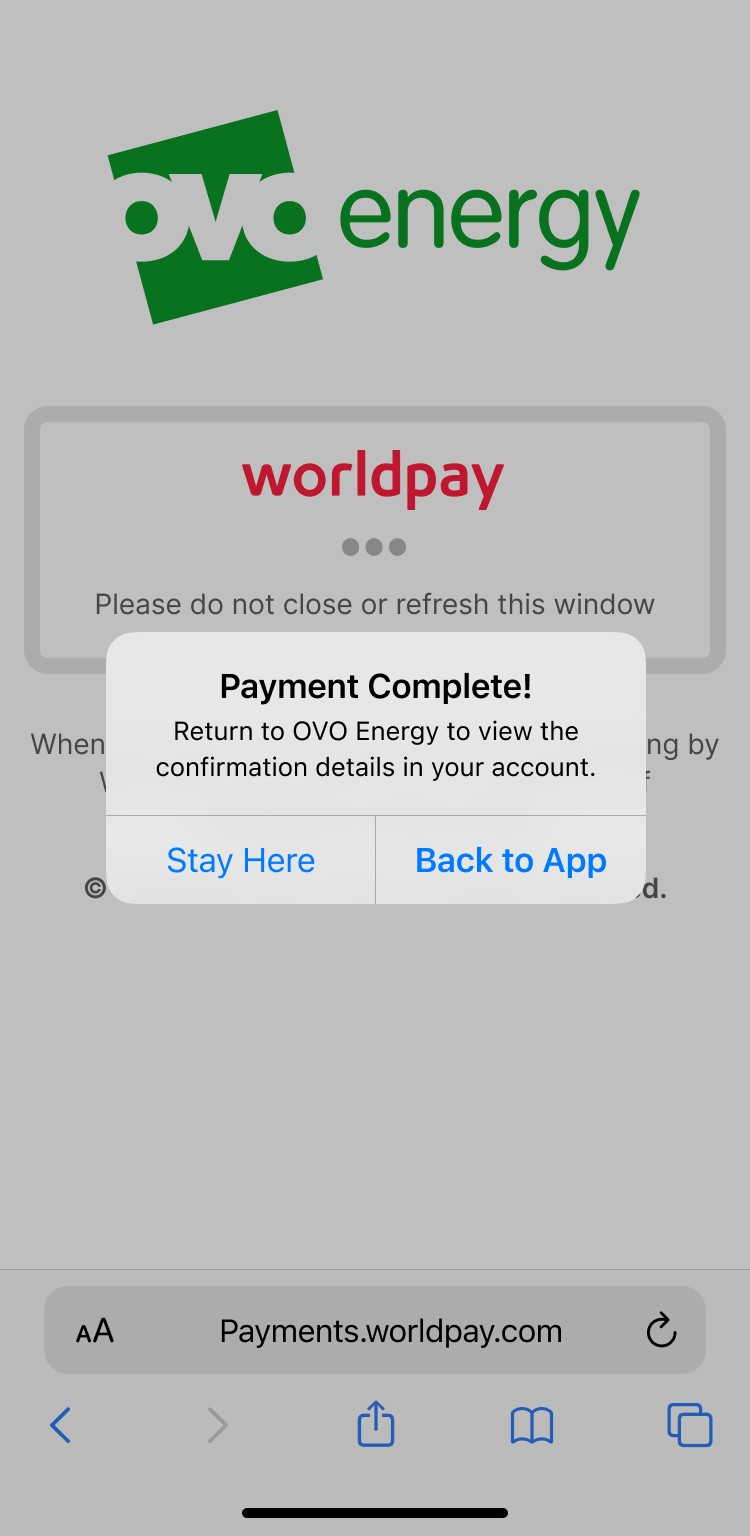
    The live app revealed an undocumented browser handoff message that interrupted customers at the moment they tried to pay. Testing the real experience via TestFlight ensured this friction was included in usability testing.

Research & Insights

Bills and online balances didn't match.

Mapping the payment journey revealed a fundamental disconnect between what customers were told to pay and what they saw online.

  • Today's Balance created confusion
    Customers received bills via email or post showing their Collectable Balance, but when they logged in to pay, the first thing they saw was Today's Balance - a different, daily-updating amount that included ongoing usage and standing charges.


  • Unexpected friction in the payment handoff
    The live app revealed an undocumented browser handoff message that interrupted customers at the moment they tried to pay. Testing the real experience via TestFlight ensured this friction was included in usability testing.

Research & Insights

Bills and online balances didn't match.

Mapping the payment journey revealed a fundamental disconnect between what customers were told to pay and what they saw online.

  • Today's Balance created confusion
    Customers received bills via email or post showing their Collectable Balance, but when they logged in to pay, the first thing they saw was Today's Balance - a different, daily-updating amount that included ongoing usage and standing charges.


  • Unexpected friction in the payment handoff
    The live app revealed an undocumented browser handoff message that interrupted customers at the moment they tried to pay. Testing the real experience via TestFlight ensured this friction was included in usability testing.

Customers got confused on bill amount and Total Balance amount.
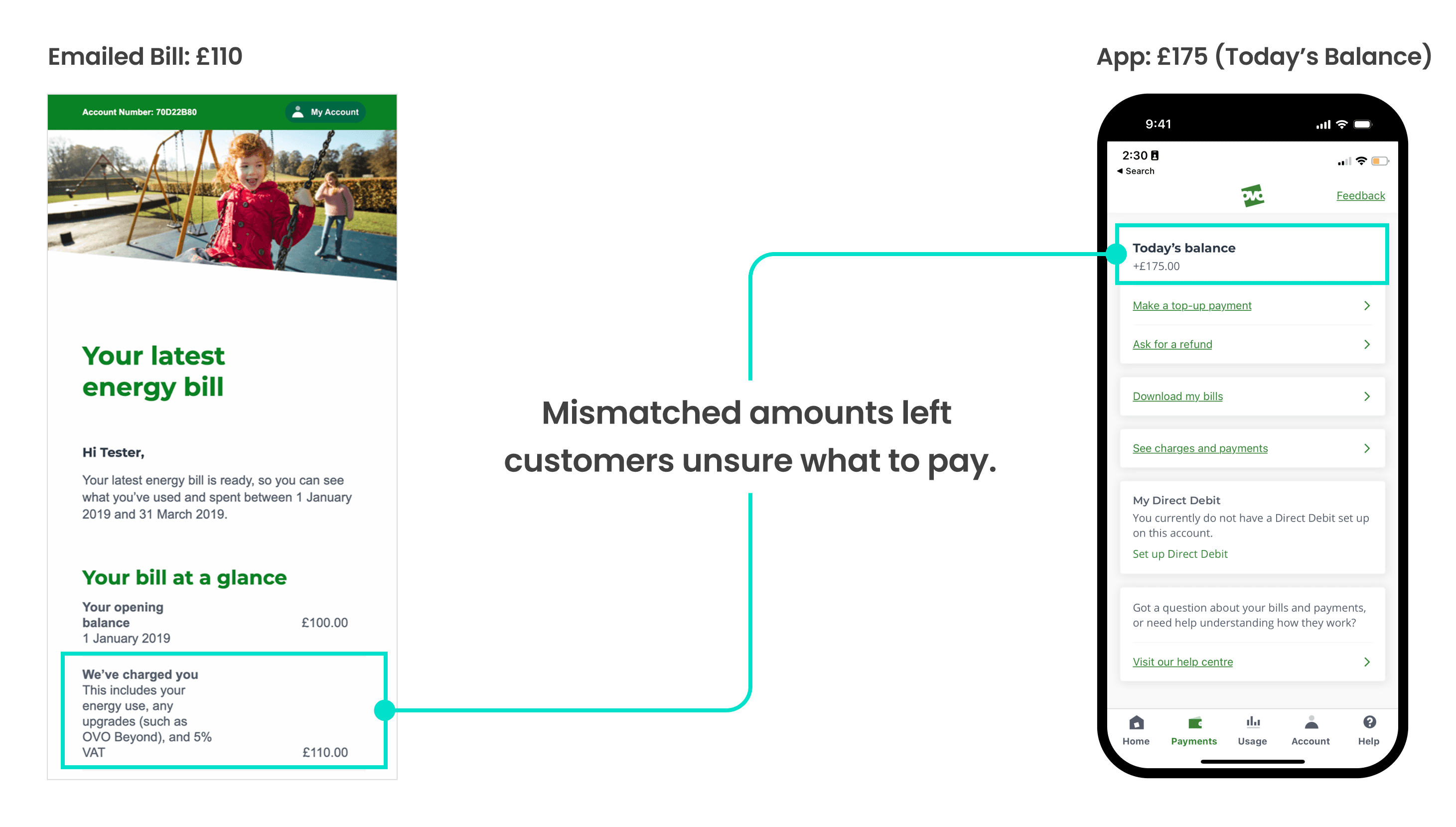
Physical Bill and App comparison

Customers got confused on bill amount and Total Balance amount.

Physical Bill and App comparison

Customers got confused on bill amount and Total Balance amount.

Physical Bill and App comparison

Solution & Improvements

Introducing Collectable Balance as the primary payment reference.

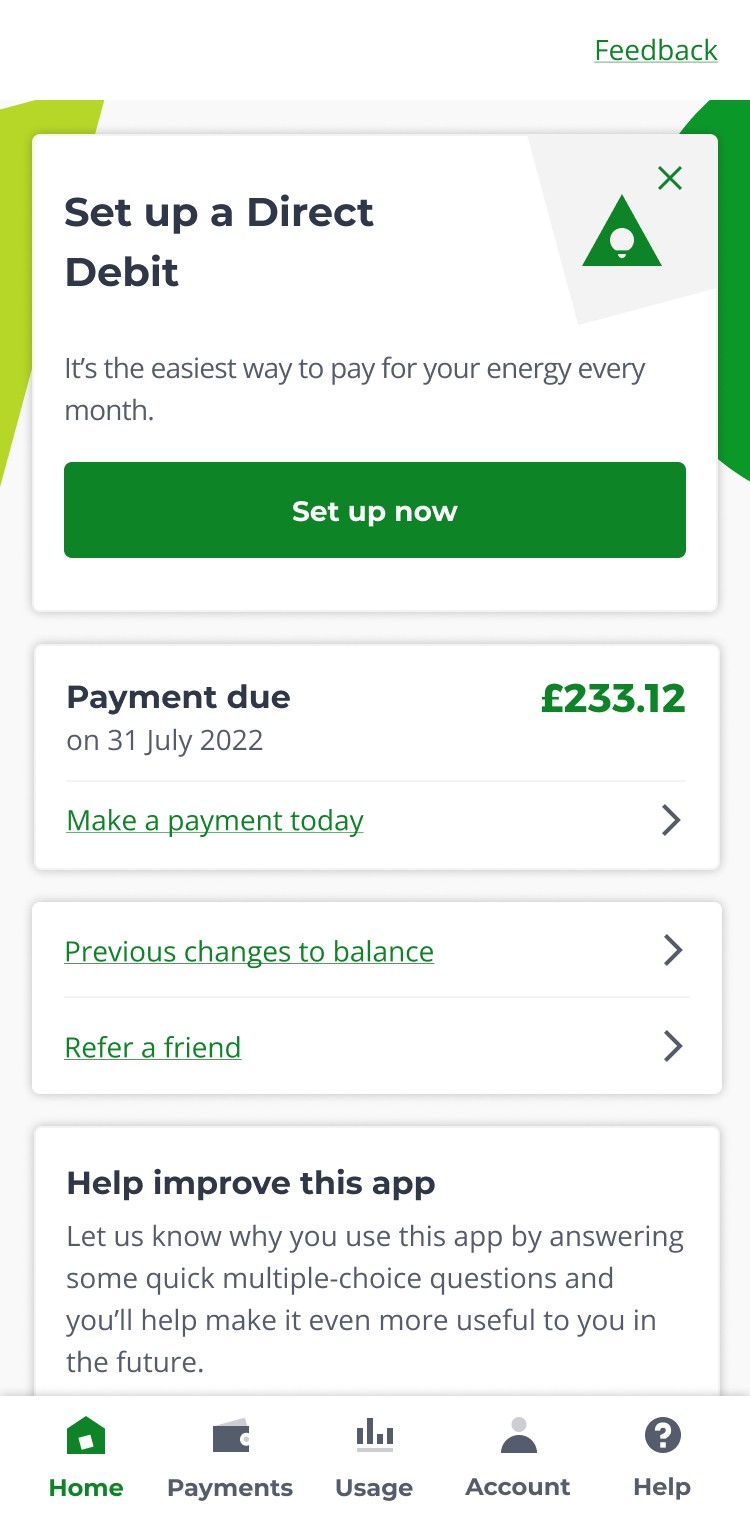
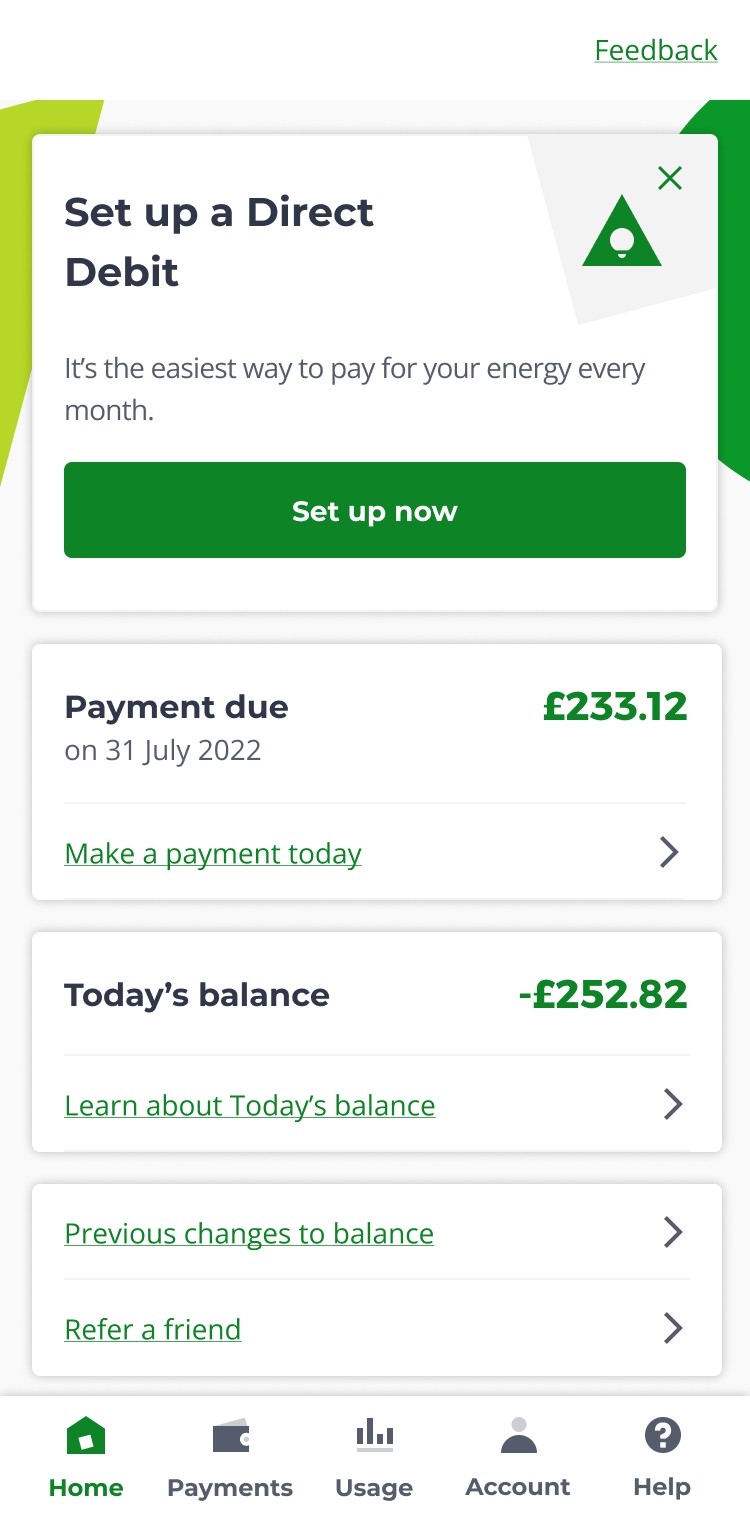
To resolve the confusion between bills and online balances, I introduced Collectable Balance as a prominent new data point on the homepage at the top, making it clear exactly how much customers needed to pay.

Would showing both balances cause confusion?

To validate whether showing Today's Balance alongside Collectable Balance would cause confusion, I designed two flows for testing:

Flow A: Payment Due card only
Showed only Collectable Balance to minimise potential confusion.

Flow B: Payment Due card + Today's Balance
Positioned the Payment Due card as primary at the top, with Today's Balance below. Added a "Learn about Today's Balance" link to help customers understand the difference between the two balances if needed.
Solution & Improvements

Introducing Collectable Balance as the primary payment reference.

To resolve the confusion between bills and online balances, I introduced Collectable Balance as a prominent new data point on the homepage at the top, making it clear exactly how much customers needed to pay.

Would showing both balances cause confusion?

To validate whether showing Today's Balance alongside Collectable Balance would cause confusion, I designed two flows for testing:

Flow A: Payment Due card only
Showed only Collectable Balance to minimise potential confusion.

Flow B: Payment Due card + Today's Balance
Positioned the Payment Due card as primary at the top, with Today's Balance below. Added a "Learn about Today's Balance" link to help customers understand the difference between the two balances if needed.

Solution & Improvements

Introducing Collectable Balance as the primary payment reference.

To resolve the confusion between bills and online balances, I introduced Collectable Balance as a prominent new data point on the homepage at the top, making it clear exactly how much customers needed to pay.

Would showing both balances cause confusion?

To validate whether showing Today's Balance alongside Collectable Balance would cause confusion, I designed two flows for testing:

Flow A: Payment Due card only
Showed only Collectable Balance to minimise potential confusion.

Flow B: Payment Due card + Today's Balance
Positioned the Payment Due card as primary at the top, with Today's Balance below. Added a "Learn about Today's Balance" link to help customers understand the difference between the two balances if needed.

12:54
Flow A: Payment due card only
12:54
Flow B: Payment due + Today's balance

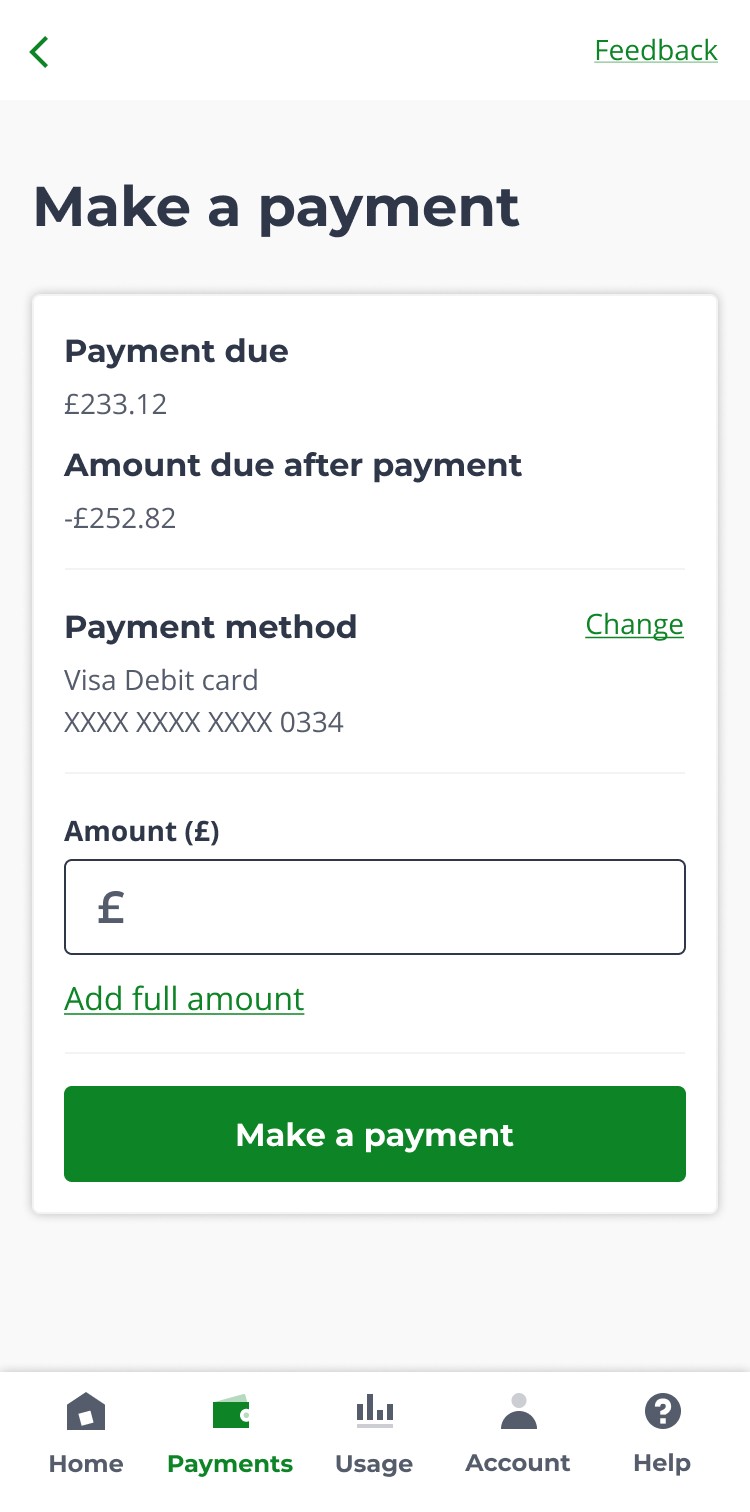
To reduce friction within the payment journey, I made three key improvements:

1

One tap option to add full payment amount
Added a "Pay full amount" link in close proximity to the payment field, allowing customers to pay their Collectable Balance with one tap rather than manually entering the amount.

2

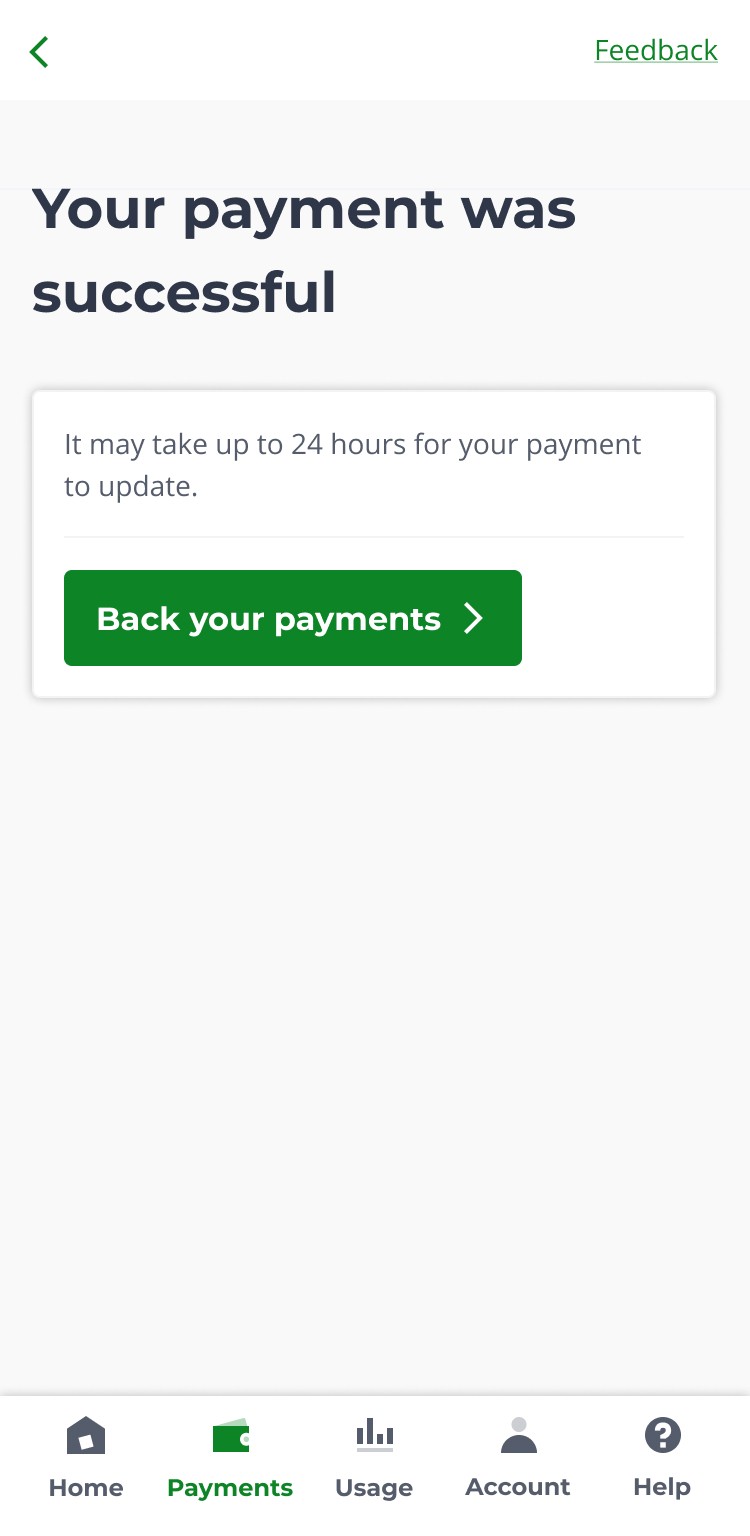
Show a clear payment confirmation
Designed a success notification that confirmed payment and explained when their balance would update, eliminating post-payment uncertainty.

3

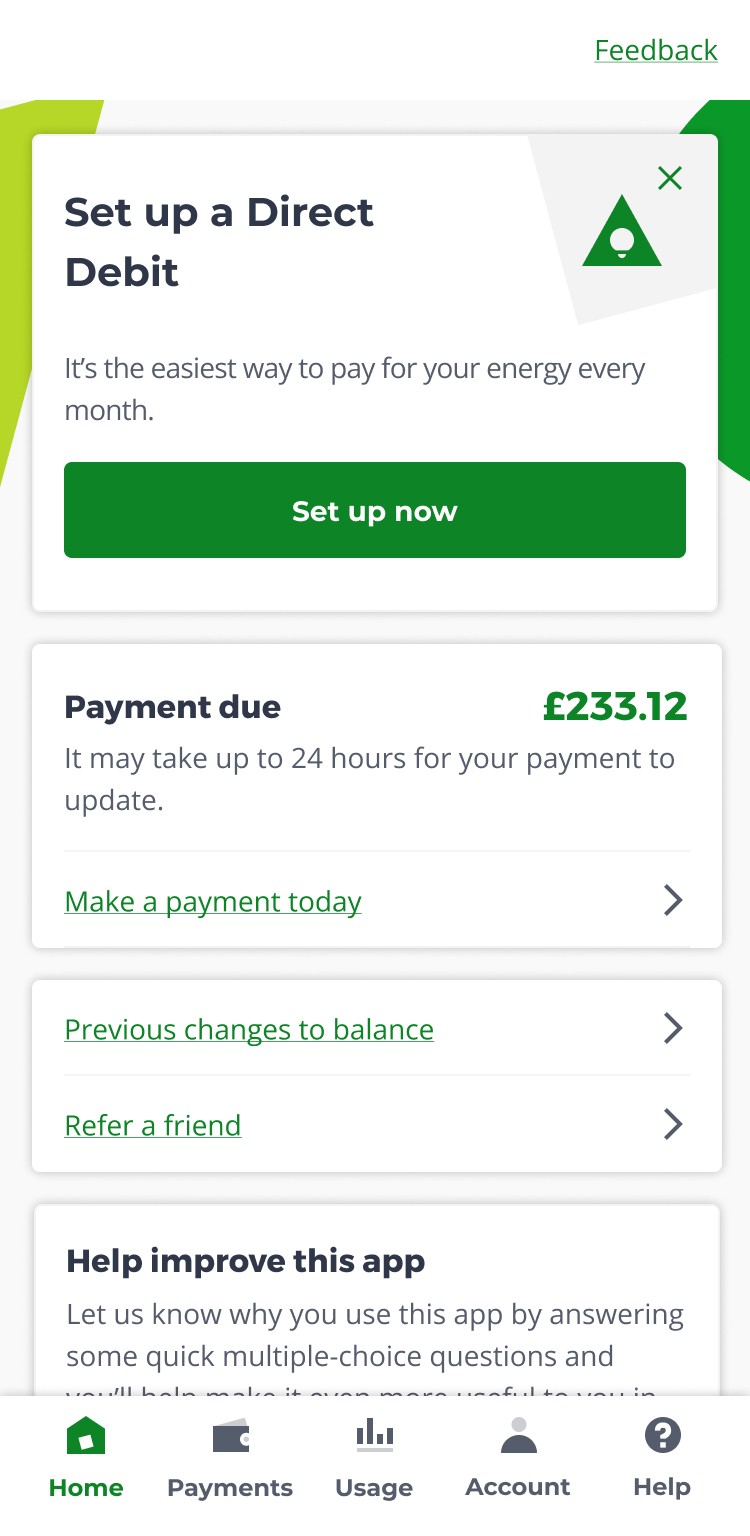
Add payment notification to homepage
Extended the payment confirmation messaging to the homepage, ensuring customers could check their payment status without re-entering the payment flow.
To reduce friction within the payment journey, I made three key improvements:

1

One tap option to add full payment amount
Added a "Pay full amount" link in close proximity to the payment field, allowing customers to pay their Collectable Balance with one tap rather than manually entering the amount.

2

Show a clear payment confirmation
Designed a success notification that confirmed payment and explained when their balance would update, eliminating post-payment uncertainty.

3

Add payment notification to homepage
Extended the payment confirmation messaging to the homepage, ensuring customers could check their payment status without re-entering the payment flow.

To reduce friction within the payment journey, I made three key improvements:

1

One tap option to add full payment amount
Added a "Pay full amount" link in close proximity to the payment field, allowing customers to pay their Collectable Balance with one tap rather than manually entering the amount.

2

Show a clear payment confirmation
Designed a success notification that confirmed payment and explained when their balance would update, eliminating post-payment uncertainty.

3

Add payment notification to homepage
Extended the payment confirmation messaging to the homepage, ensuring customers could check their payment status without re-entering the payment flow.

12:54

1

2

12:54

3

12:54

Usability Testing

Payment clarity was validated, but a system handoff message created unexpected friction

I conducted unmoderated usability tests with 10 participants recruited through the UserTesting panel. Participants were briefed on the scenario: they had received a bill and needed to log into the OVO app to pay it.


What we tested

I tested two flows with 5 participants each, starting from the login screen:

Flow A: Payment Due card only
Only Collectable Balance shown to minimise potential confusion.

Flow B: Payment Due card + Today's Balance


Both balances shown with clear hierarchy to test whether this would cause confusion.

Usability Testing

Payment clarity was validated, but a system handoff message created unexpected friction

I conducted unmoderated usability tests with 10 participants recruited through the UserTesting panel. Participants were briefed on the scenario: they had received a bill and needed to log into the OVO app to pay it.


What we tested

I tested two flows with 5 participants each, starting from the login screen:

Flow A: Payment Due card only
Only Collectable Balance shown to minimise potential confusion.

Flow B: Payment Due card + Today's Balance


Both balances shown with clear hierarchy to test whether this would cause confusion.

Usability Testing

Payment clarity was validated, but a system handoff message created unexpected friction

I conducted unmoderated usability tests with 10 participants recruited through the UserTesting panel. Participants were briefed on the scenario: they had received a bill and needed to log into the OVO app to pay it.


What we tested

I tested two flows with 5 participants each, starting from the login screen:

Flow A: Payment Due card only
Only Collectable Balance shown to minimise potential confusion.

Flow B: Payment Due card + Today's Balance


Both balances shown with clear hierarchy to test whether this would cause confusion.

Flow A and Flow B tested with customers to validate whether displaying both balances would cause payment confusion.

Key questions to validate

  • Would two balances confuse customers?


  • Would customers understand the new Collectable Balance data point?


  • Would the "Pay full amount" link reduce friction?


  • Would the 24-hour payment processing message cause concern?

Key questions to validate

  • Would two balances confuse customers?


  • Would customers understand the new Collectable Balance data point?


  • Would the "Pay full amount" link reduce friction?


  • Would the 24-hour payment processing message cause concern?

Key questions to validate

  • Would two balances confuse customers?


  • Would customers understand the new Collectable Balance data point?


  • Would the "Pay full amount" link reduce friction?


  • Would the 24-hour payment processing message cause concern?

Both flows succeeded, but showing both balances performed better

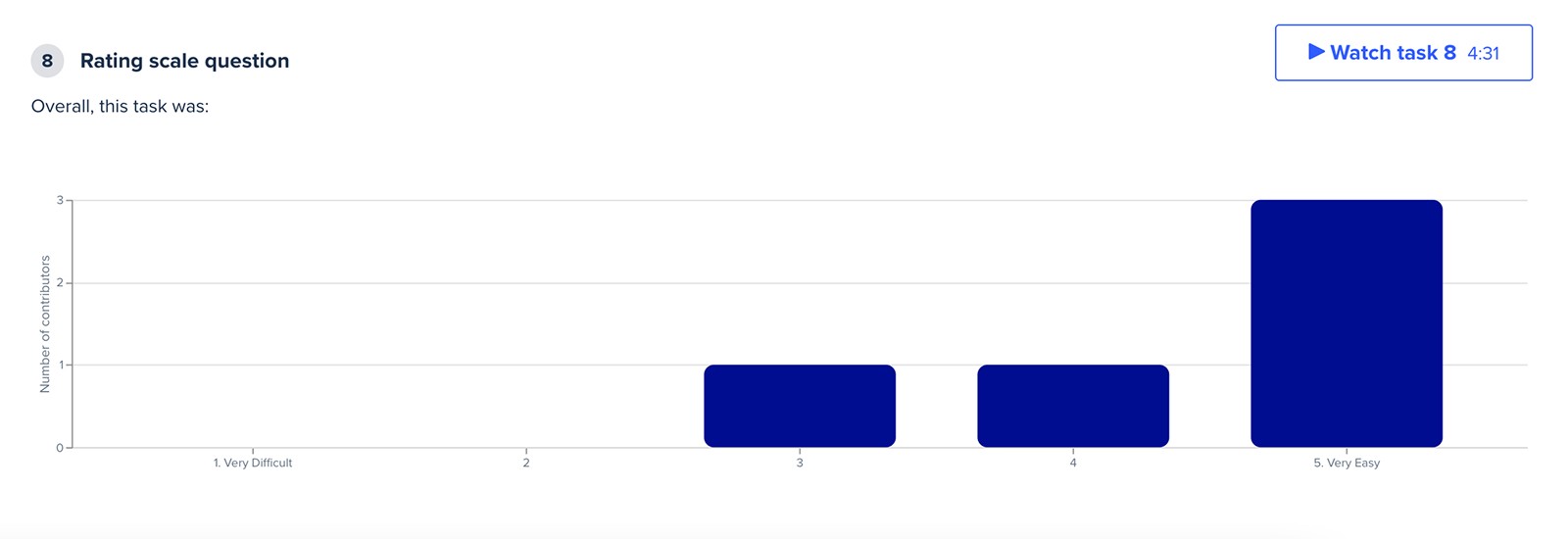
All 10 participants successfully completed payments without confusion about which amount to pay. However, the ratings revealed a clear preference.

Both flows succeeded, but showing both balances performed better

All 10 participants successfully completed payments without confusion about which amount to pay. However, the ratings revealed a clear preference.

Both flows succeeded, but showing both balances performed better

All 10 participants successfully completed payments without confusion about which amount to pay. However, the ratings revealed a clear preference.

Flow A: Payment Due card only

Flow A: Payment Due card only

Flow A: Payment Due card only

Rated 3/5 for ease of use
Rated 3/5 for ease of use

Rated 3/5 for ease of use

Flow B: Payment Due card + Today's Balance

Contrary to initial concerns that showing both balances might confuse customers, Flow B with both balances actually performed better. The hierarchy worked as intended - participants understood the distinction and appreciated having both data points visible.

Flow B: Payment Due card + Today's Balance

Contrary to initial concerns that showing both balances might confuse customers, Flow B with both balances actually performed better. The hierarchy worked as intended - participants understood the distinction and appreciated having both data points visible.

Flow B: Payment Due card + Today's Balance

Contrary to initial concerns that showing both balances might confuse customers, Flow B with both balances actually performed better. The hierarchy worked as intended - participants understood the distinction and appreciated having both data points visible.

Rated 5/5 for ease of use
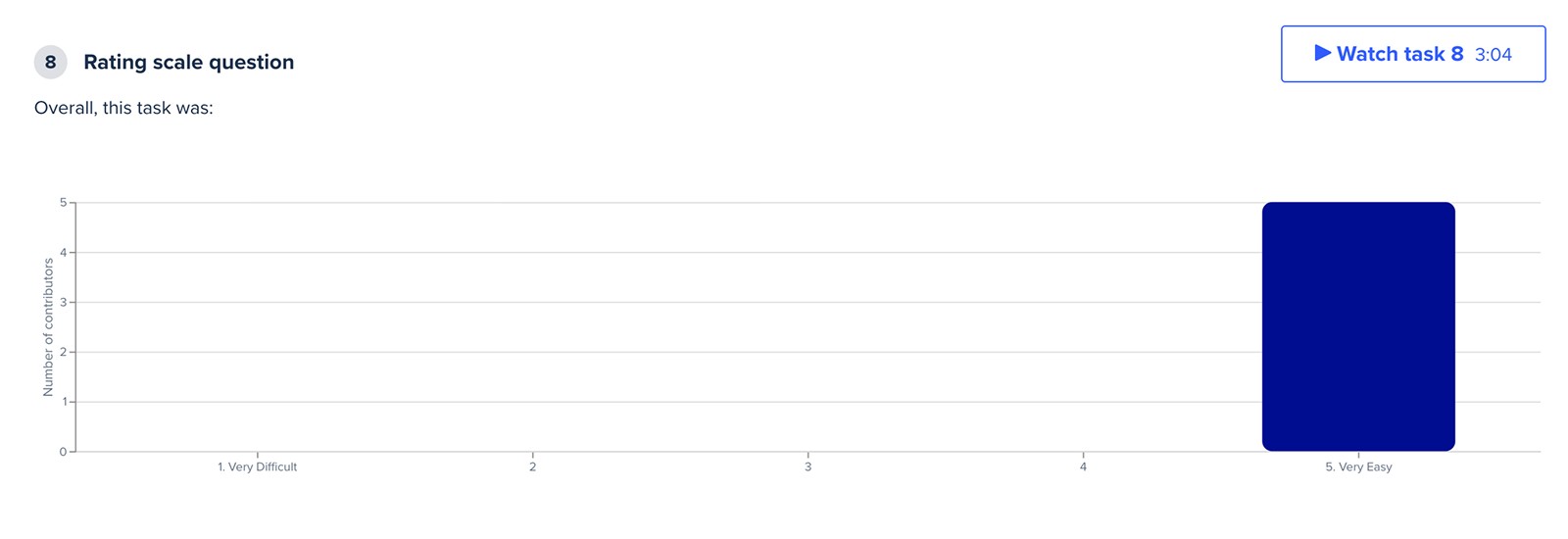
Rated 5/5 for ease of use

Rated 5/5 for ease of use

Insights

A generic system modal disrupted payment initiation

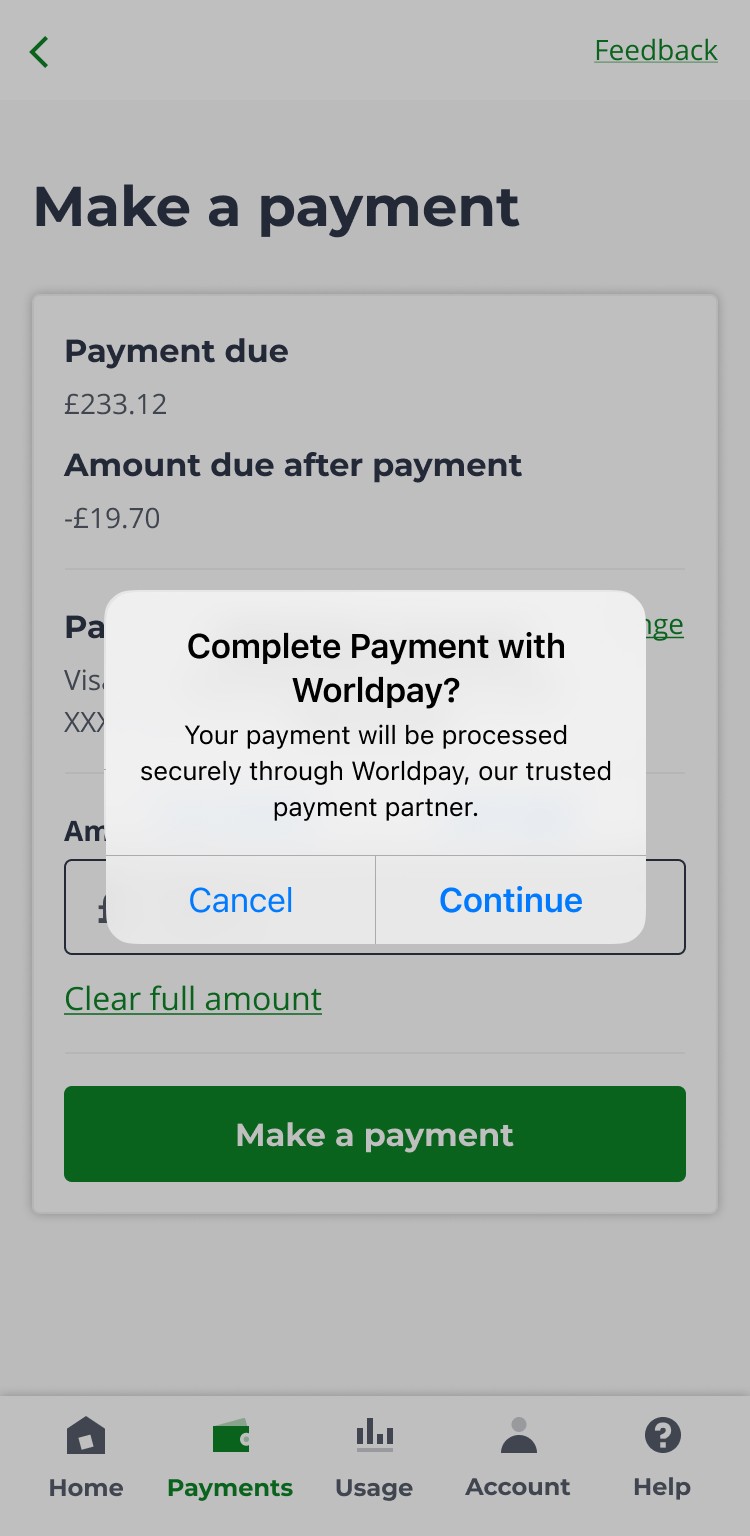
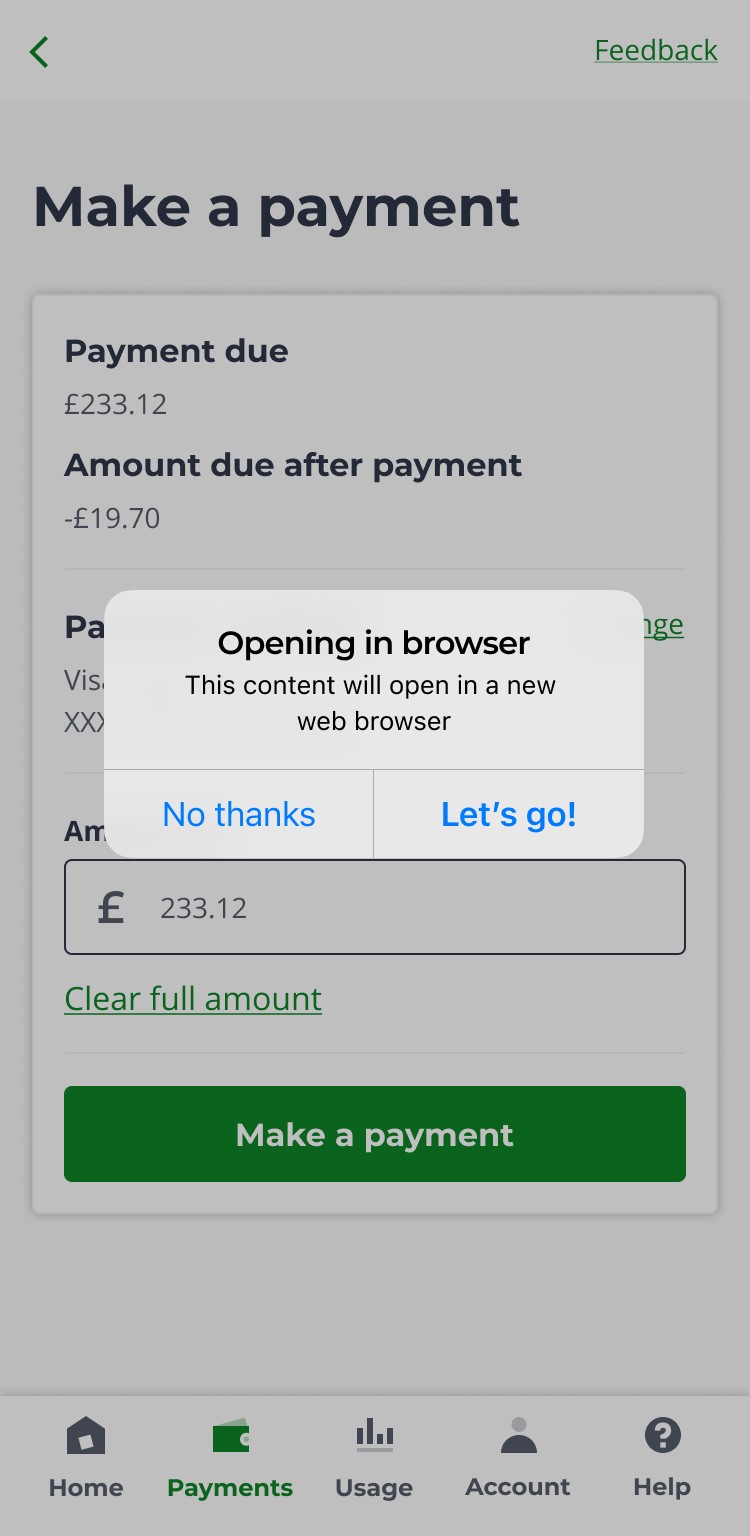
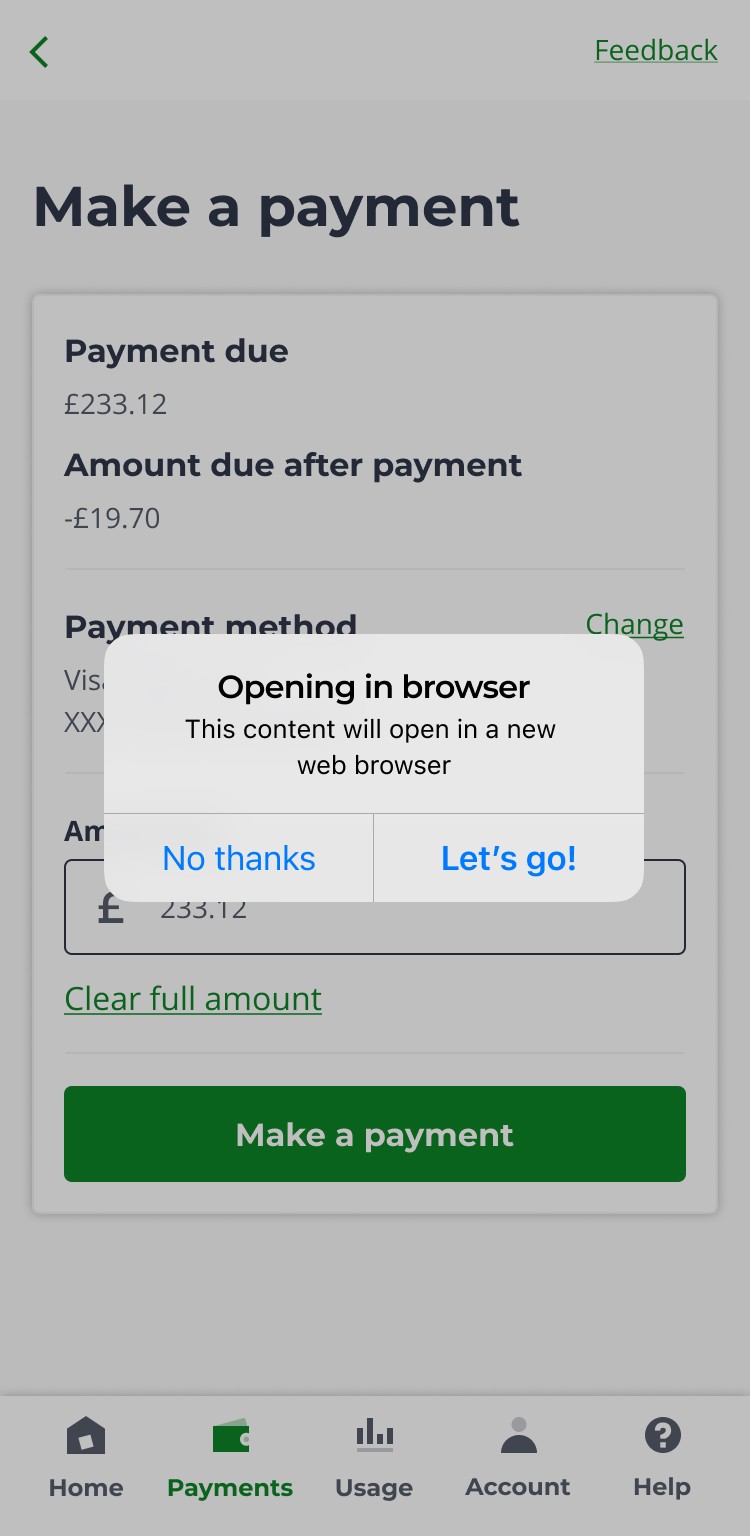
When users tapped "Make a payment," a system modal appeared stating the process would continue in a new browser tab (required for Worldpay's secure payment processing). This generic message caused confusion and hesitation - some users even clicked "No thanks," unintentionally abandoning the payment.

Insights

A generic system modal disrupted payment initiation

When users tapped "Make a payment," a system modal appeared stating the process would continue in a new browser tab (required for Worldpay's secure payment processing). This generic message caused confusion and hesitation - some users even clicked "No thanks," unintentionally abandoning the payment.

Insights

A generic system modal disrupted payment initiation

When users tapped "Make a payment," a system modal appeared stating the process would continue in a new browser tab (required for Worldpay's secure payment processing). This generic message caused confusion and hesitation - some users even clicked "No thanks," unintentionally abandoning the payment.

Insights

A generic system modal disrupted payment initiation

When users tapped "Make a payment," a system modal appeared stating the process would continue in a new browser tab (required for Worldpay's secure payment processing). This generic message caused confusion and hesitation - some users even clicked "No thanks," unintentionally abandoning the payment.

12:54
12:54
Opening in browser. This content will open in a new web browser. OK, that's a bit strange.
FW
– User 4
That was quite confusing. That was a little bit all over the place with several windows opening up.
GM
– User 6
So giving you an option, would you like to do this? I'm not sure why. So it would have been good to give a reason why it's going to do this
HV
– User 5
So just the wording of that made me think something bad was gonna happen. I wasn't sure if I should do it.
WB
– User 7

Suggested Improvements

Redesigning modals for clarity and trust

Suggested Improvements

Redesigning modals for clarity and trust

Suggested Improvements

Redesigning modals for clarity and trust

Suggested Improvements

Redesigning modals for clarity and trust

Payment initiation modal improvements:

1

Clearer context: New title explains what users are agreeing to and why it's happening

2

Building trust: Replaced generic technical language with reassuring security messaging and introduced Worldpay as a "trusted payment partner"

3

Clear actionable buttons: Button labels now match Apple's guidelines and user expectations for secure financial transactions
Payment initiation modal improvements:

1

Clearer context: New title explains what users are agreeing to and why it's happening

2

Building trust: Replaced generic technical language with reassuring security messaging and introduced Worldpay as a "trusted payment partner"

3

Clear actionable buttons: Button labels now match Apple's guidelines and user expectations for secure financial transactions

Payment initiation modal improvements:

1

Clearer context: New title explains what users are agreeing to and why it's happening

2

Building trust: Replaced generic technical language with reassuring security messaging and introduced Worldpay as a "trusted payment partner"

3

Clear actionable buttons: Button labels now match Apple's guidelines and user expectations for secure financial transactions

Payment initiation modal improvements:

1

Clearer context: New title explains what users are agreeing to and why it's happening

2

Building trust: Replaced generic technical language with reassuring security messaging and introduced Worldpay as a "trusted payment partner"

3

Clear actionable buttons: Button labels now match Apple's guidelines and user expectations for secure financial transactions

12:54
Before

1

2

12:54
After

3

12:54
Before

1

2

12:54
After

3

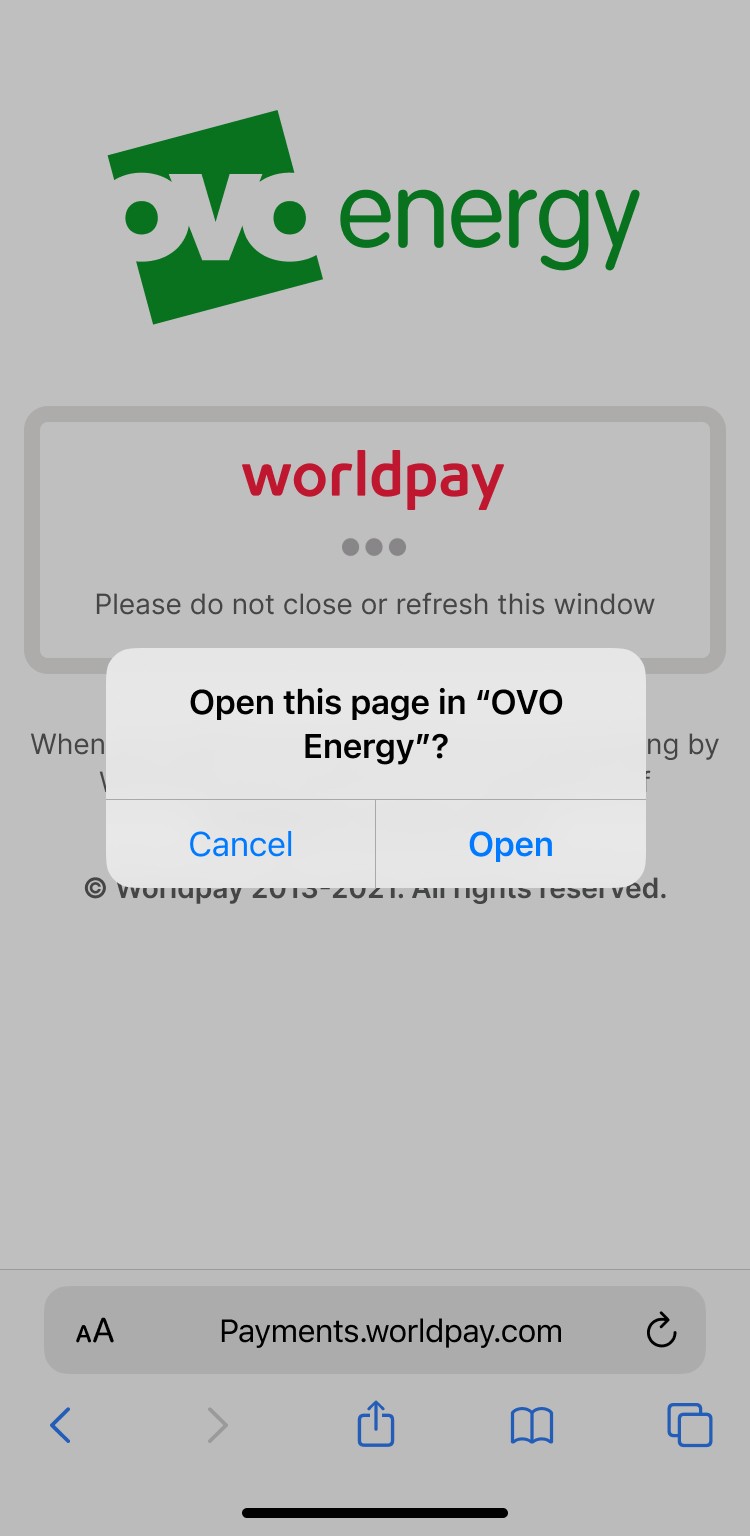
Return to app modal improvements:

1

Confirms success upfront: Immediately reduces anxiety about whether payment went through

2

Clear reason to return: Gives customers a specific reason to go back to the app (viewing confirmation details)

3

Explicit button labels: "Return to OVO App" is clearer than generic "Open" by explicitly stating the destination and action

Return to app modal improvements:

1

Confirms success upfront: Immediately reduces anxiety about whether payment went through

2

Clear reason to return: Gives customers a specific reason to go back to the app (viewing confirmation details)

3

Explicit button labels: "Return to OVO App" is clearer than generic "Open" by explicitly stating the destination and action

Return to app modal improvements:

1

Confirms success upfront: Immediately reduces anxiety about whether payment went through

2

Clear reason to return: Gives customers a specific reason to go back to the app (viewing confirmation details)

3

Explicit button labels: "Return to OVO App" is clearer than generic "Open" by explicitly stating the destination and action

Return to app modal improvements:

1

Confirms success upfront: Immediately reduces anxiety about whether payment went through

2

Clear reason to return: Gives customers a specific reason to go back to the app (viewing confirmation details)

3

Explicit button labels: "Return to OVO App" is clearer than generic "Open" by explicitly stating the destination and action

Further insights

Pending Due" label created post-payment anxiety.

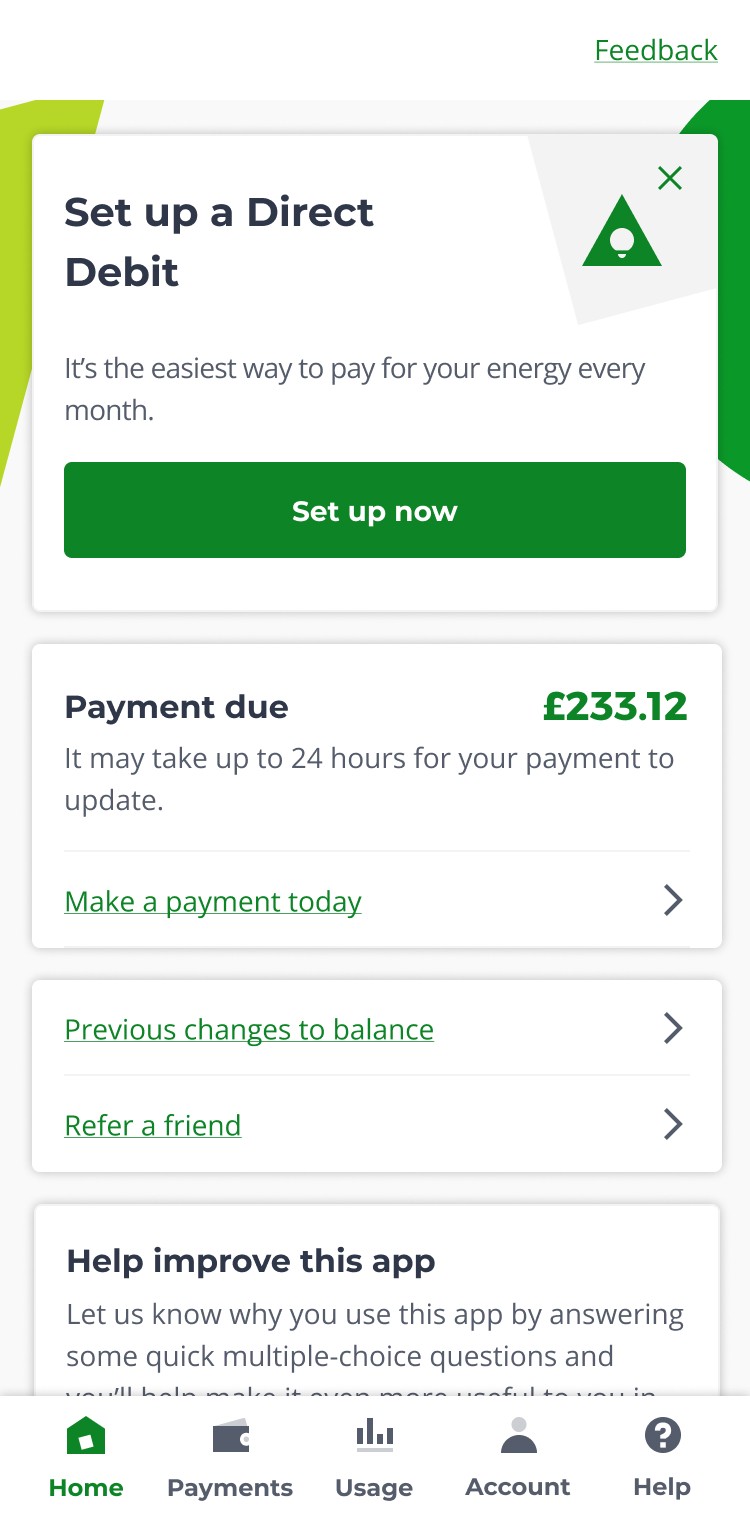
After completing payment, users saw "Pending Due" as the status label, despite a clear message stating "it may take up to 24 hours for your profile to update." Users interpreted "Pending Due" as their payment still being outstanding rather than processing, causing unnecessary concern.
Further insights

Pending Due" label created post-payment anxiety.

After completing payment, users saw "Pending Due" as the status label, despite a clear message stating "it may take up to 24 hours for your profile to update." Users interpreted "Pending Due" as their payment still being outstanding rather than processing, causing unnecessary concern.

Further insights

Pending Due" label created post-payment anxiety.

After completing payment, users saw "Pending Due" as the status label, despite a clear message stating "it may take up to 24 hours for your profile to update." Users interpreted "Pending Due" as their payment still being outstanding rather than processing, causing unnecessary concern.

I would have liked on the homepage an acknowledgement of payment pending.
RM
– User 3
I would have liked on the homepage an acknowledgement of payment pending.
RM
– User 3
For people who are less confident with online payent, give a liitle bit of confirmation that the payment actually came through.
HD
– User 8
For people who are less confident with online payent, give a liitle bit of confirmation that the payment actually came through.
HD
– User 8
12:54
Payment due title still shown after payment.

Suggested Improvements

A simple copy change aligned to user expectations

Suggested Improvements

A simple copy change aligned to user expectations

Suggested Improvements

A simple copy change aligned to user expectations

1

Problem: The "Payment due" title still showed after payment completion, causing confusion and uncertainty about transaction success.

2

Solution: Replaced with "Payment pending" status to provide immediate feedback and align with users' mental model of the payment process.

1
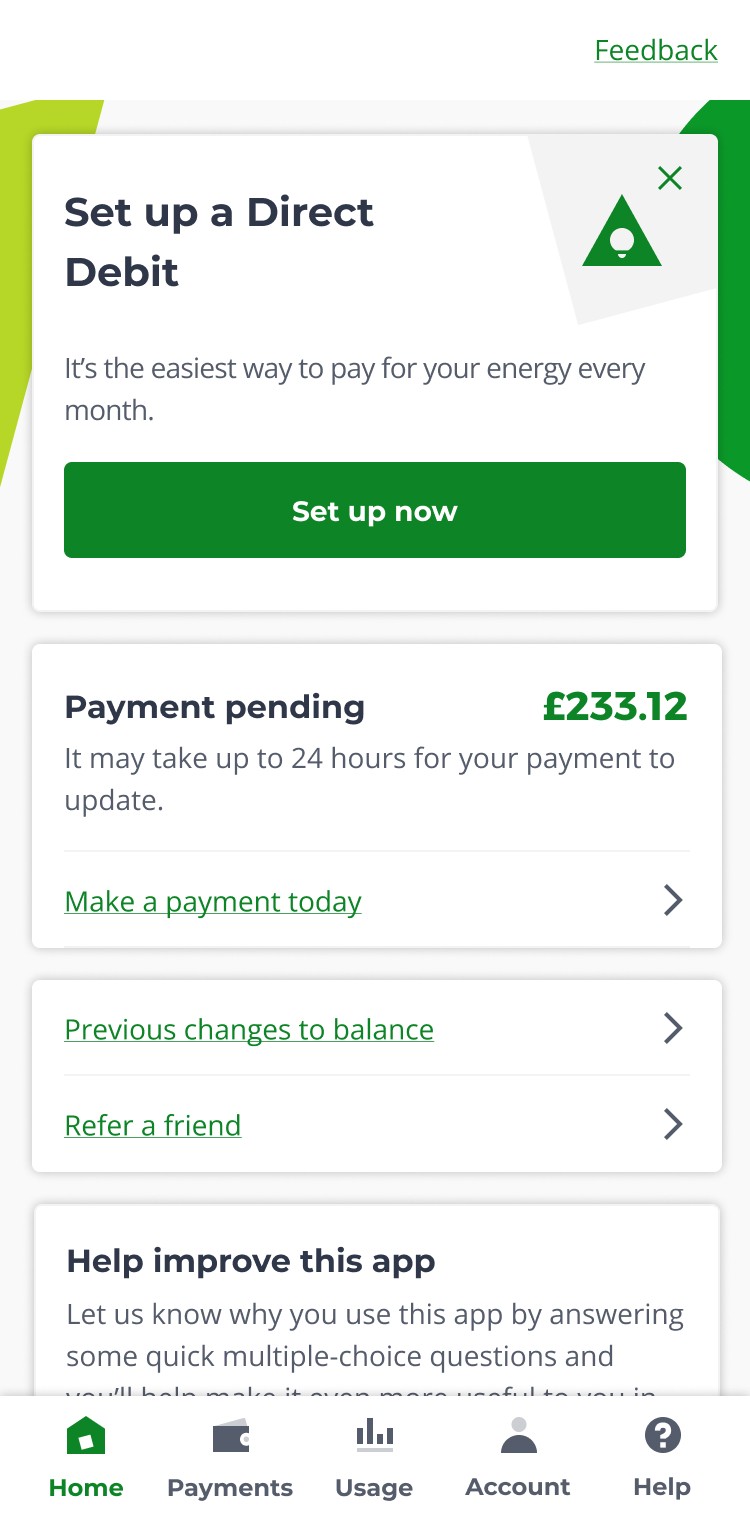
Problem: The "Payment due" title still showed after payment completion, causing confusion and uncertainty about transaction success.

2

Solution: Replaced with "Payment pending" status to provide immediate feedback and align with users' mental model of the payment process.

1

Problem: The "Payment due" title still showed after payment completion, causing confusion and uncertainty about transaction success.

2

Solution: Replaced with "Payment pending" status to provide immediate feedback and align with users' mental model of the payment process.

12:54
Before

1

12:54
After

2

Outcome

Collectable Balance improved clarity, and the team chose the lower‑risk variant for launch.

In testing, Flow A (Collectable Balance only) received a lower ease‑of‑use rating because two participants struggled with the modal copy and the transition into the external Worldpay payment screen, describing it as confusing and disruptive. This modal and redirect pattern also existed in Flow B, but participants did not penalise Flow B as heavily in their overall difficulty ratings, even though they still mentioned the same friction in their comments.

Despite Flow B (collectable + Today's Balance) testing better on perceived ease of use, the team ultimately chose Flow A for launch because it presented a single, unambiguous amount to pay. In a sensitive context like billing, the product lead prioritised reducing any potential future confusion between two amounts over the marginal usability benefit of showing both balances in one view.

• Flow A (Showing Collectable balance only): 3/5 ease

• Flow B (Showing both balances): 5/5 ease

Outcome

Collectable Balance improved clarity, and the team chose the lower‑risk variant for launch.

In testing, Flow A (Collectable Balance only) received a lower ease‑of‑use rating because two participants struggled with the modal copy and the transition into the external Worldpay payment screen, describing it as confusing and disruptive. This modal and redirect pattern also existed in Flow B, but participants did not penalise Flow B as heavily in their overall difficulty ratings, even though they still mentioned the same friction in their comments.

Despite Flow B (collectable + Today's Balance) testing better on perceived ease of use, the team ultimately chose Flow A for launch because it presented a single, unambiguous amount to pay. In a sensitive context like billing, the product lead prioritised reducing any potential future confusion between two amounts over the marginal usability benefit of showing both balances in one view.

• Flow A (Showing Collectable balance only): 3/5 ease

• Flow B (Showing both balances): 5/5 ease

Outcome

Collectable Balance improved clarity, and the team chose the lower‑risk variant for launch.

In testing, Flow A (Collectable Balance only) received a lower ease‑of‑use rating because two participants struggled with the modal copy and the transition into the external Worldpay payment screen, describing it as confusing and disruptive. This modal and redirect pattern also existed in Flow B, but participants did not penalise Flow B as heavily in their overall difficulty ratings, even though they still mentioned the same friction in their comments.

Despite Flow B (collectable + Today's Balance) testing better on perceived ease of use, the team ultimately chose Flow A for launch because it presented a single, unambiguous amount to pay. In a sensitive context like billing, the product lead prioritised reducing any potential future confusion between two amounts over the marginal usability benefit of showing both balances in one view.

• Flow A (Showing Collectable balance only): 3/5 ease

• Flow B (Showing both balances): 5/5 ease
100%

Payed their bill

100%

Payed their bill

100%

Noticed it would take up to 24hrs

100%

Noticed it would take up to 24hrs

TestFlight Logo
TestFlight Logo

Lessons learned

Stepping beyond design files revealed the true customer experience

By collaborating with developers and using TestFlight builds on a real device, it became possible to see the actual customer journey, not just the documented screens. This exposed undocumented modals and the Worldpay transition, which were then recreated in Figma and included in usability testing, leading to insights that would have been invisible from design files alone.

TestFlight Logo

Lessons learned

Stepping beyond design files revealed the true customer experience

By collaborating with developers and using TestFlight builds on a real device, it became possible to see the actual customer journey, not just the documented screens. This exposed undocumented modals and the Worldpay transition, which were then recreated in Figma and included in usability testing, leading to insights that would have been invisible from design files alone.

TestFlight Logo

Lessons learned

Stepping beyond design files revealed the true customer experience

By collaborating with developers and using TestFlight builds on a real device, it became possible to see the actual customer journey, not just the documented screens. This exposed undocumented modals and the Worldpay transition, which were then recreated in Figma and included in usability testing, leading to insights that would have been invisible from design files alone.

Further Case Studies